Explore/chainide.com
Hosted appArc Testnet ↗succeeded

chainide.com

chainide.com ↗

Tested in place byDeepQA TeamonArc Testnetatchainide.com/s/ethereumonOct 13, 2026

Run #10model gemini-balancedtook 15m

7 of 11 scenarios passed, 4 blocked, no issues after the audit.

Share on X
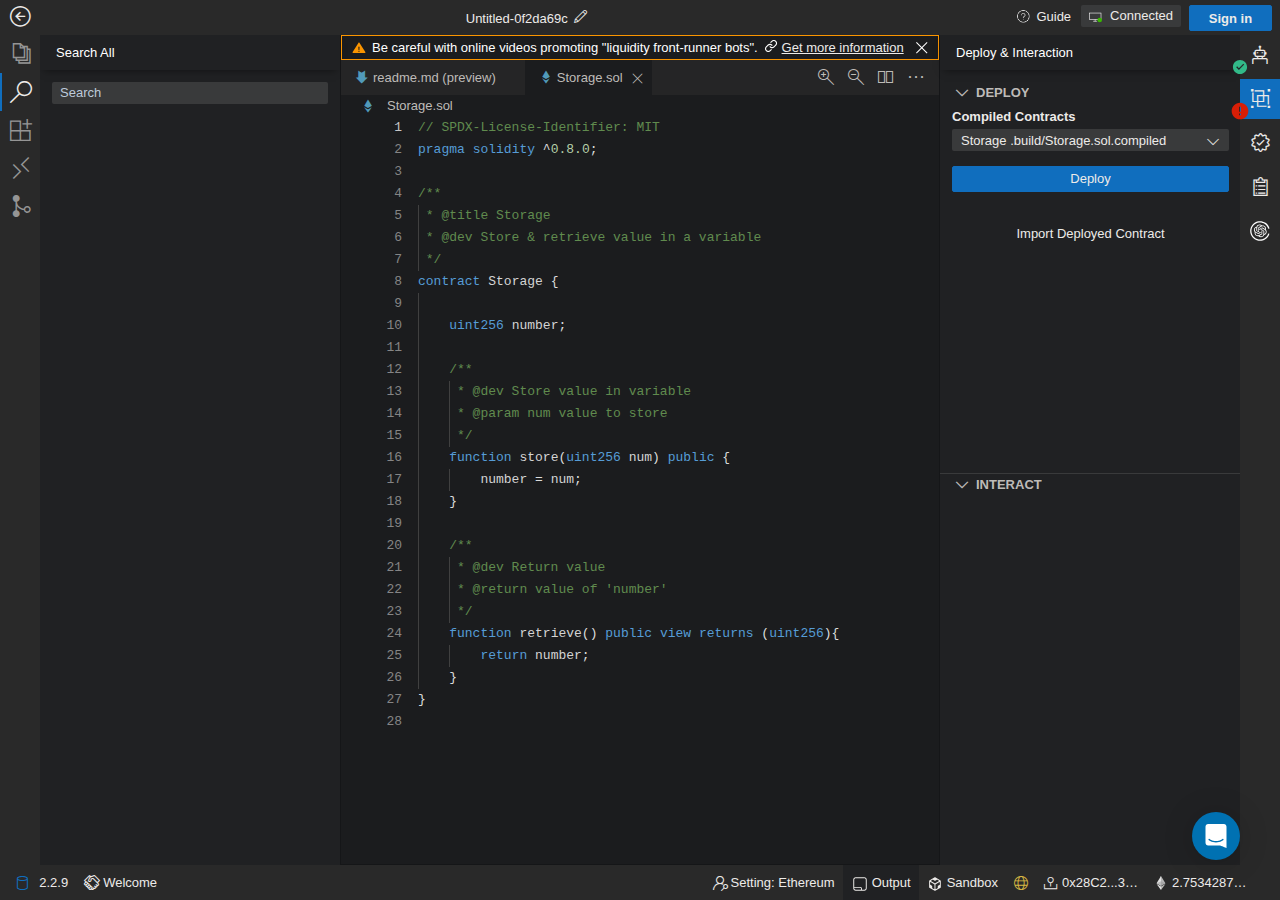
chainide.com in the browser during the run

By the numbers

7 of 11
scenarios passed, 4 blocked
242
browser actions
21
screenshots
154
model calls
15
minutes
1
on-chain transactions
11
scenarios
7
passed
0
failed
4
blocked
0
issues

Walkthrough

Every scenario DeepQA drove in the browser, in plan order, with the 21 screenshots it captured along the way. A passing scenario is evidence too.

  1. S4
    Connect to Injected Web3 Provider

    4 steps

    blocked
    • 2 dialogs covered the page on load, one over another. They were closed in turn before anything else was done: "Sign in to ChainIDE" through its own control, then "Introduction" through its own control.
    • Navigated to https://chainide.com/s/ethereum.
    • The application displays 'Setting: Ethereum' in the bottom status bar and a 'Connect to a Wallet' panel offering 'JavaScript VM' and 'Injected Web3 Provider'.
    • Selecting 'Injected Web3 Provider' expanded to show 'Metamask' as the only wallet option.
    • The test wallet is injected and locked to Arc testnet (chain id 5042002), whereas the application is configured for Ethereum without an Arc testnet network option.
  2. S10
    Deploy contract and reject transaction

    6 steps, 1 screenshot

    blocked
    S10-15.png
    S10, Deploy contract and reject transaction
    • A dialog ("Sign in to ChainIDE") covered the page on load. It was closed through its own control before anything else was done.
    • Navigated to https://chainide.com/s/ethereum and created a project containing Storage.sol.
    • Connected injected test wallet via 'Connect Wallet' -> 'Injected Web3 Provider' -> 'Metamask' (connected address 0x28C2...39AF).
    • Compiled Storage.sol successfully in the Compile panel and switched to Deploy & Interaction panel.
    • Called wallet_reject_next and clicked 'Deploy'.
    • The wallet rejected the deployment transaction request; the application handled the rejection gracefully without crashing, freezing, or falsely showing the deployment as submitted.
    • The application showed Ethereum, not Arc testnet (chain id 5042002).
  3. S11
    Deploy contract successfully on Arc testnet

    5 steps, 1 screenshot

    pass
    S11-16.png
    S11, Deploy contract successfully on Arc testnet
    • A dialog ("Sign in to ChainIDE") covered the page on load. It was closed through its own control before anything else was done.
    • Navigated to https://chainide.com/s/ethereum and clicked 'Creating Project'.
    • Opened Storage.sol and compiled it using the Solidity compiler.
    • Connected injected Web3 provider wallet (0x28C2...39AF), showing initial balance of 2.7534287633762498.
    • Navigated to the Deploy & Interaction panel.
    • Initiated contract deployment by clicking Deploy; button showed pending deploy state ('Deploy' with loading indicator).
    • Deployment confirmed on Arc testnet, the deployed contract appeared under Interact as 'Storage@0x93...05E9', and balance updated to 2.75028623837625.
  4. S8
    Load Polygon multi-chain workspace

    3 steps, 2 screenshots

    blocked
    S8-13.png
    S8, Load Polygon multi-chain workspace
    S8-15.png
    S8, Load Polygon multi-chain workspace
    • A dialog ("Sign in to ChainIDE") covered the page on load. It was closed through its own control before anything else was done.
    • Navigated to https://chainide.com/s/polygon.
    • Dismissed the guest authentication modal by clicking 'Continue as Guest'.
    • Clicked 'Connect Wallet', selected 'Injected Web3 Provider', and chose 'Metamask'.
    • The test wallet is on Arc testnet (chain id 5042002) and rejects switches to other networks.
    • Rather than detecting network mismatch with Polygon or failing a required switch prompt to Polygon and displaying a mismatch error, the application displayed 'Connected' with a 'Metamask is connected' toast, silently accepting the connection without validating the chain.
    • The application showed Setting: Ethereum, not Arc testnet (chain id 5042002); 1 finding was set aside.
  5. S1
    Initialize guest workspace and load contract

    4 steps, 2 screenshots

    pass
    S1-4.png
    S1, Initialize guest workspace and load contract
    S1-5.png
    S1, Initialize guest workspace and load contract
    • A dialog ("Sign in to ChainIDE") covered the page on load. It was closed through its own control before anything else was done.
    • Navigated to /s/ethereum and clicked 'Creating Project', which successfully initialized a guest workspace and populated the file explorer with 'Storage.sol' and 'readme.md'.
    • Selected 'Storage.sol' from the file explorer; the editor tab opened displaying 'Storage.sol' with the compiler panel showing 'Compile Storage.sol'.
    • The guest workspace initialized without requiring an account or login.
    • The editor pane opened Storage.sol and rendered the editor content tab along with the compiler action 'Compile Storage.sol'.
  6. S2
    Compile standard Solidity template

    4 steps, 2 screenshots

    pass
    S2-8.png
    S2, Compile standard Solidity template
    S2-9.png
    S2, Compile standard Solidity template
    • A dialog ("Sign in to ChainIDE") covered the page on load. It was closed through its own control before anything else was done.
    • Clicked 'Creating Project' button and project creation modal appeared.
    • Opened Storage.sol, which enabled the 'Compile Storage.sol' button in the Solidity Compile form.
    • Solidity compilation finished successfully. The terminal output showed compilation logs and generated the .build directory with the compiled 'Storage' contract artifact.
    • Navigated to https://chainide.com/s/ethereum and selected 'Creating Project' with the default template.
    • Opened Storage.sol and navigated to the Solidity Compile tab.
    • Clicked 'Compile Storage.sol' with compiler v0.8.19+commit.7dd6d404.
    • Compilation finished successfully: terminal output showed '[info] Compiling contract... [info] Release...' and the compiled Storage artifact appeared in the panel alongside the generated .build directory.
  7. S3
    Connect to JavaScript VM wallet

    4 steps, 2 screenshots

    pass
    S3-14.png
    S3, Connect to JavaScript VM wallet
    S3-15.png
    S3, Connect to JavaScript VM wallet
    • A dialog ("Sign in to ChainIDE") covered the page on load. It was closed through its own control before anything else was done.
    • Connected to the JavaScript VM wallet option in ChainIDE, showing 'Connected', 'JavaScript VM Network', and local test account 0x5B38...ddC4 with 100 ETH.
    • Navigated to https://chainide.com/s/ethereum and initialized a guest project.
    • Clicked 'Connect Wallet' and chose the 'JavaScript VM' provider option.
    • The UI immediately updated to show 'Connected' and 'JavaScript VM is connected'.
    • The network indicator displayed 'JavaScript VM Network' with test account 0x5B38...ddC4 and balance 100 ETH.
  8. S5
    Toggle IDE side panels

    4 steps, 4 screenshots

    pass
    S5-4.png
    S5, Toggle IDE side panels
    S5-7.png
    S5, Toggle IDE side panels
    S5-10.png
    S5, Toggle IDE side panels
    S5-12.png
    S5, Toggle IDE side panels
    • A dialog ("Sign in to ChainIDE") covered the page on load. It was closed through its own control before anything else was done.
    • Project created successfully with files Storage.sol and readme.md. Explorer side panel is currently open.
    • Clicking the File Explorer toggle collapsed the left Explorer side panel smoothly.
    • Navigated to https://chainide.com/s/ethereum and clicked 'Creating Project' to initialize a workspace.
    • Clicked the File Explorer toggle on the activity bar; the File Explorer side panel collapsed smoothly.
    • Clicked the Git Manager toggle on the activity bar; the Git Manager side panel expanded smoothly showing GitHub sign-in options.
    • Clicked the Git Manager toggle again; the Git side panel collapsed smoothly without breaking the layout.
    • Clicked the File Explorer toggle to re-expand the panel; the file tree with Storage.sol and readme.md displayed properly.
  9. S6
    Navigate bottom tool panes

    4 steps, 3 screenshots

    pass
    S6-7.png
    S6, Navigate bottom tool panes
    S6-9.png
    S6, Navigate bottom tool panes
    S6-12.png
    S6, Navigate bottom tool panes
    • A dialog ("Sign in to ChainIDE") covered the page on load. It was closed through its own control before anything else was done.
    • Successfully navigated to Ethereum workspace and created project Untitled-03244ec8.
    • Switching between Output and Sandbox bottom tabs updates the pane content cleanly and immediately without rendering defects or overlaps.
    • The Output tab displays the output editor/console content when selected.
    • The Sandbox tab displays the 'Click to add Sandbox' and 'Add' buttons when selected.
    • Switching between bottom tabs (Output and Sandbox) in both the tab header bar and the bottom status bar transitions instantly without content overlap or display errors.
  10. S7
    Persist local browser settings across reloads

    5 steps, 2 screenshots

    blocked
    S7-9.png
    S7, Persist local browser settings across reloads
    S7-10.png
    S7, Persist local browser settings across reloads
    • A dialog ("Sign in to ChainIDE") covered the page on load. It was closed through its own control before anything else was done.
    • Checked the Optimization checkbox in the Solidity compile panel before reloading.
    • Navigated to https://chainide.com/s/ethereum and clicked 'Creating Project'.
    • Checked the 'Optimization' checkbox in the Solidity Compile form.
    • Reloaded https://chainide.com/s/ethereum, clicked 'Continue as Guest', and clicked 'Creating Project'.
    • Observed that the 'Optimization' checkbox in the Solidity Compile form was unchecked instead of retaining its checked state.
  11. S9
    Check start page load integrity

    2 steps, 2 screenshots

    pass
    S9-3.png
    S9, Check start page load integrity
    S9-4.png
    S9, Check start page load integrity
    • A dialog ("Sign in to ChainIDE") covered the page on load. It was closed through its own control before anything else was done.
    • The page at https://chainide.com/s/ethereum loads completely with all structural components (navigation bar, explorer sidebar, editor panel, warning banner, and bottom status bar) intact and zero console errors.
    • The page loaded without crashing or blank screen at https://chainide.com/s/ethereum.
    • The top header, explorer panel, editor workspace, warning banner dialog, and bottom status bar rendered properly.
    • Zero console errors were reported from the page origin.

Issues

Findings that survived the Critic's audit. Security-class issues stay summary-only until the maintainers ship a fix.

lowwithdrawnfunctionalF1 in S7

Solidity compiler Optimization setting does not persist across page reloads

The replay explicitly initialized a completely new workspace by clicking 'Creating Project' after the reload, which correctly loads the default unoptimized compiler settings rather than restoring the previous unpersisted session.

Expected

The 'Optimization' checkbox should remain checked across page reloads.

Actual

The 'Optimization' checkbox reverts to its default unchecked state after reloading the page and creating/opening a project.

5 repro steps
  1. Navigate to https://chainide.com/s/ethereum
  2. Click 'Continue as Guest' (if prompted) and click 'Creating Project'.
  3. In the Solidity compile panel, check the 'Optimization' checkbox.
  4. Reload the page by navigating to https://chainide.com/s/ethereum.
  5. Click 'Continue as Guest', click 'Creating Project', and inspect the 'Optimization' checkbox in the Compile panel.

Wallet activity

DeepQA injected a test wallet into the browser and recorded every request the app sent to it. Testnet funds only.

address
0x28C278…7c39AF ↗
chain
Arc Testnet
browsers opened
2
connects
12
read requests forwarded
15
signing requests
2
time (UTC)scenariomethodsummaryresult
15:33:32Scenario 10eth_sendTransactionto (create) value 0 data 368 bytesdeclined on purpose, to test how the app handles a rejection
15:34:23Scenario 11eth_sendTransactionto (create) value 0 data 368 bytestx 0xb17439…f30103 ↗confirmed on chainbalance -0.003142 USDC

Critic audit

An adversarial second pass over every finding before it reaches the report.

1
findings reviewed
1
live replays
1
withdrawn
  • F1withdrawn

    The replay explicitly initialized a completely new workspace by clicking 'Creating Project' after the reload, which correctly loads the default unoptimized compiler settings rather than restoring the previous unpersisted session.

  • The tester blocked scenarios S4, S8, and S10 citing a network mismatch with the test wallet's pinned Arc testnet, yet S11 passed and successfully deployed a contract on that exact same network.
  • Scenario S10 was marked as blocked even though its observations clearly show its expected result of gracefully recovering from a rejected transaction was fully met.
  • A possible defect in S1 ("HTTP 400 error logged during workspace initialization") was not promoted: the live replay came back not-reproduced.

Report

QA report: chainide.com

Core IDE workflows succeeded and no application defects were confirmed during testing.

Testing exercised the core Ethereum IDE workflows on ChainIDE, including guest workspace initialization, Solidity template compilation, JavaScript VM connection, UI panel toggling, bottom tool pane navigation, and contract deployment on the Arc testnet.

No confirmed issues remain after audit. A single finding concerning Solidity compiler settings persistence across page reloads was withdrawn during review, leaving zero defects across all evaluated flows.

Four scenarios were blocked from completion due to external testnet and wallet network matching constraints or unverified assertions, leaving injected Web3 provider connection, rejected transaction recovery, and Polygon workspace loading partially unverified.

Run summary
MetricCount
Scenarios executed11
Passed7
Failed0
Blocked4
Findings raised1
Issues after the audit0
Withdrawn by the audit1
Critical / high / medium / low0 / 0 / 0 / 0
  • Target: https://chainide.com/s/ethereum
  • Testing level: core_workflow
  • Stack: unknown
Issues

No issues survived the audit.

Withdrawn findings

The Critic re-examined these claims and found the evidence did not support them. They are kept here rather than deleted.

  • Solidity compiler Optimization setting does not persist across page reloads (S7, low): The replay explicitly initialized a completely new workspace by clicking 'Creating Project' after the reload, which correctly loads the default unoptimized compiler settings rather than restoring the previous unpersisted session.
Scenario results
ScenarioPriorityResultIssues
S4 Connect to Injected Web3 Providerhighblocked (the app cannot be put on the run's chain The wallet step never ran.)none
S10 Deploy contract and reject transactionhighblocked (the app cannot be put on the run's chain)none
S11 Deploy contract successfully on Arc testnethighpassnone
S8 Load Polygon multi-chain workspacehighblocked (the app cannot be put on the run's chain)none
S1 Initialize guest workspace and load contracthighpassnone
S2 Compile standard Solidity templatehighpassnone
S3 Connect to JavaScript VM wallethighpassnone
S5 Toggle IDE side panelsmediumpassnone
S6 Navigate bottom tool panesmediumpassnone
S7 Persist local browser settings across reloadsmediumblocked after audit (The failure rested only on findings the audit set aside, so the main result was not checked.)none
S9 Check start page load integritylowpassnone
The audit

The Critic reviewed 1 finding and ran 1 live replay in the browser, each on a fresh page. 0 of the 0 reported issues were reproduced live.

  • The tester blocked scenarios S4, S8, and S10 citing a network mismatch with the test wallet's pinned Arc testnet, yet S11 passed and successfully deployed a contract on that exact same network.
  • Scenario S10 was marked as blocked even though its observations clearly show its expected result of gracefully recovering from a rejected transaction was fully met.
  • A possible defect in S1 ("HTTP 400 error logged during workspace initialization") was not promoted: the live replay came back not-reproduced.
Coverage and caveats

In scope:

  • Ethereum and Polygon workspaces
  • Guest workspace initialization
  • Solidity compilation flows
  • Wallet connections (Injected and JS VM)
  • Contract deployment state handling via injected test wallet
  • IDE layout, side panels, and tool panes

Not covered:

  • GitHub authentication (requires account, out of scope for hosted target)
  • External origin navigation outside /s/ bounds
  • An injected test wallet on Arc testnet (chain id 5042002) is available.
  • The 'deploy interactions tab' reported in the AppMap contains standard deployment controls to initiate transactions.
  • Connecting to the Polygon workspace requests a network switch to Polygon, triggering the required wrong-network test since the test wallet strictly enforces Arc testnet.
  • S4 could not be executed: the app cannot be put on the run's chain The wallet step never ran..
  • S10 could not be executed: the app cannot be put on the run's chain.
  • S8 could not be executed: the app cannot be put on the run's chain.
  • S7 could not be executed: The failure rested only on findings the audit set aside, so the main result was not checked..
By the numbers
MetricValue
Scenarios7 passed, 0 failed, 4 blocked of 11 (45 planned steps)
Browser actions242 (90 clicks, 2 inputs, 14 navigations, 136 snapshots)
Screenshots21 (0 explore, 21 scenario, 0 critic), 21 captioned
Coverage3 pages, 1 forms, 3 flows, 1 console errors
Audit1 findings, 1 re-verified live, 0 confirmed, 0 promoted, 1 withdrawn
Time15 min
Wallet1 transactions, 0 signatures, 1 refusals on chain 5042002

Run log

stagecallstokenstime
Plan0s
Test1441.1M12m 45s
Critique940.5k1m 51s
Report12.3k6s
Total1541.1M14m 43s
✓Intake
–Explore
✓Plan
✓Test
✓Critique
●Report
  • 15:28:04Zintakeintake started
  • 15:28:05ZintakeExternal target https://chainide.com/s/ethereum, tested in place, with a test wallet on chain 5042002.
  • 15:28:05ZexploreExplored in the plan phase: its map is reused.
  • 15:28:05Zplanplan started
  • 15:28:05ZplanUsing the plan of run run-mv66hhg0oaoh unchanged: 11 scenarios.
  • 15:28:05Zplanplan completed in 0s.
  • 15:28:05Ztesttest started
  • 15:31:20ZtestS4 executed (blocked)
  • 15:33:43ZtestS10 executed (blocked)
  • 15:35:20ZtestS11 executed (pass)
  • 15:36:23ZtestS8 executed (blocked)
  • 15:36:47ZtestS1 executed (pass)
  • 15:37:18ZtestS2 executed (pass)
  • 15:38:30ZtestS3 executed (pass)
  • 15:39:08ZtestS5 executed (pass)
  • 15:39:56ZtestS6 executed (pass)
  • 15:40:33ZtestS7 executed (fail), 1 finding
  • 15:40:51ZtestS9 executed (pass)
  • 15:40:51ZtestExecuted 11 scenarios: 7 passed, 1 failed, 3 blocked, 1 finding.
  • 15:40:51Ztesttest completed in 765s.
  • 15:40:51Zcritiquecritique started
  • 15:42:01Zcritique1 severity was set from the impact and likelihood matrix: F1 low.
  • 15:42:01ZcritiqueReviewed 1 findings; 1 possible defect spotted in passed scenarios.
  • 15:42:42ZcritiqueRe-verified a possible defect in S1: not-reproduced.
  • 15:42:42Zcritique1 scenario result was changed by the audit: S7 fail to blocked.
  • 15:42:42ZcritiqueAudit complete: 0 confirmed, 1 withdrawn, 0 promoted, 1 re-verified live.
  • 15:42:42Zcritiquecritique completed in 111s.
  • 15:42:42Zreportreport started
  • 15:42:48ZreportReported 0 issues (0 critical, 0 high, 0 medium, 0 low) from 1 finding.
  • 15:42:48Zreportreport completed in 6s.
  • 15:43:01ZreportReport r1 is not released: 2 release checks failed.

Put an agent team on your next pull request.

Connect a repo, dispatch a Run, and read an audited, evidence-backed report the same day.